How to Integrate WhatsApp with Your Real Estate CRM
Business app or Business Platform? What changes when WhatsApp is connected to your CRM, a 10-step setup checklist, common mistakes and how Meta charges for messages.
Arthaleads Team · · 8 min read
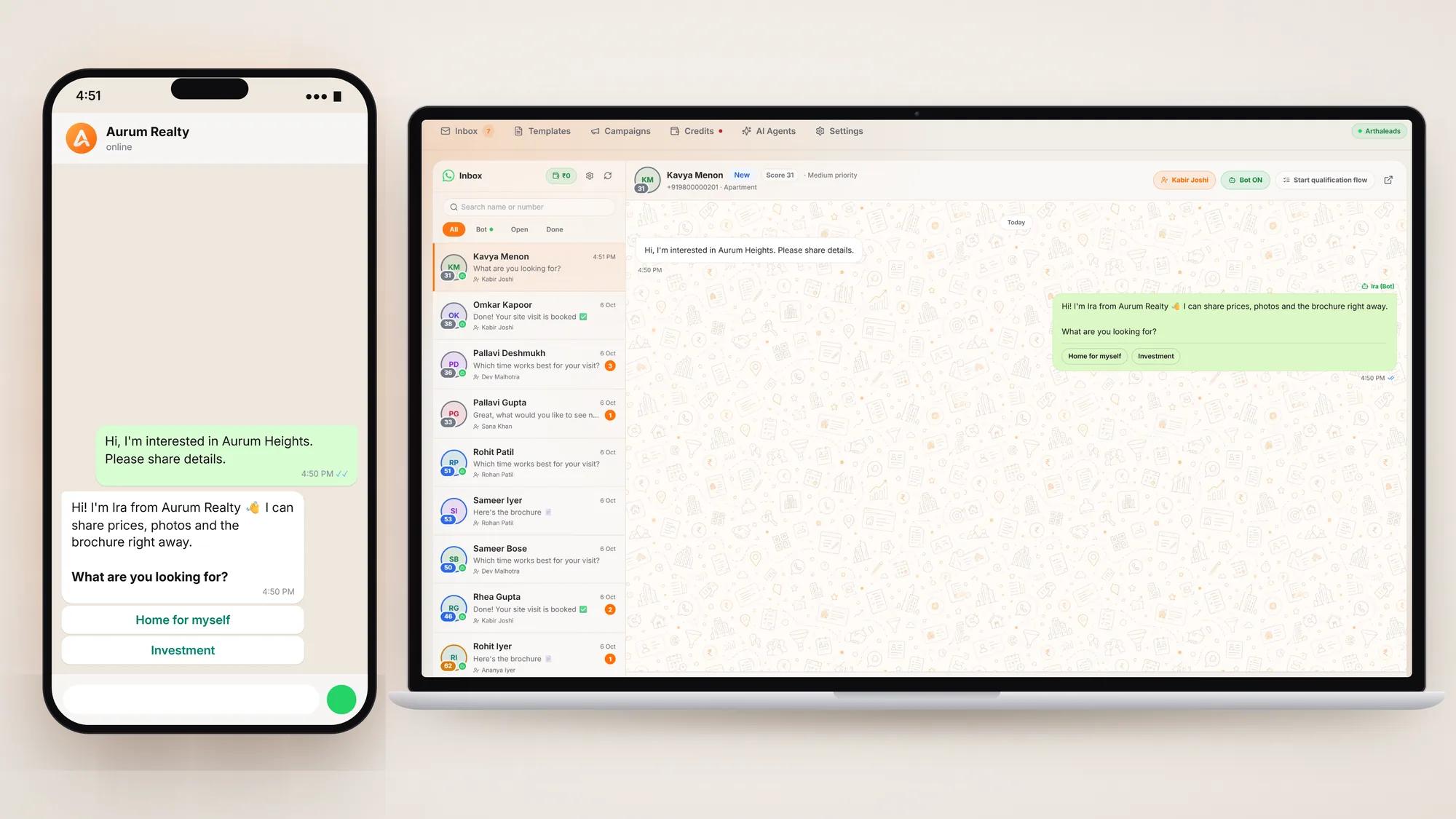
For most Indian property buyers, the first real conversation with a builder or broker happens on WhatsApp. Yet in many sales teams those chats still sit on individual phones, outside any record, and leave the company when the agent does. WhatsApp CRM integration fixes that by connecting your business number to the system where your leads, follow-ups and reports already live.
This guide explains the two versions of WhatsApp for business, what changes once WhatsApp is connected to your CRM, a step-by-step setup checklist, the mistakes teams commonly make, and how the costs work.
WhatsApp Business app vs WhatsApp Business Platform
There are two different products, and the difference matters.
The WhatsApp Business app is the free app you install on a phone. Meta describes it as built for small business owners, and it gives you a business profile, a product catalogue, greeting messages and away replies. It works well for a solo broker. Its limits show up as soon as a team grows: the chats are tied to that app and that number, there is no proper way to assign chats to agents, and nothing flows automatically into a CRM.
The WhatsApp Business Platform, often called the WhatsApp API, is meant for businesses that need WhatsApp to work at scale. Meta's own page notes that it can integrate with back-end systems such as CRM and marketing automation tools. You do not use it through a phone app. Instead, software such as a CRM connects to it, and your team works from that software.
In short, the app is a phone tool for one person, while the platform is the foundation for proper WhatsApp CRM integration across a team. A quick way to decide:
- One person, a few chats a day: the Business app is often enough.
- A team of agents or telecallers, several projects, ads that lead to WhatsApp: you need the Platform, connected to your CRM.
What WhatsApp CRM integration actually changes
Once your business number runs on the Platform and is connected to a CRM, five things change.
A shared inbox instead of personal phones
All chats on your business number appear in one inbox that the whole team can see, with each chat assigned to an owner. If an agent goes on leave or leaves the company, the conversation and its history stay with the business. Managers can see which chats are still waiting for a reply.
Every new chat becomes a lead
When a new number messages you, a lead is created automatically with the source recorded. Nobody has to copy numbers into a sheet at the end of the day, and nothing is lost because a phone was busy.
Consent is recorded, not assumed
WhatsApp requires businesses to get permission before sending business-initiated messages. Meta's opt-in guidance says the person must clearly agree to receive messages from your business, and that your business must be clearly named when they do. A good integration stores each lead's consent status, so marketing messages skip anyone who said no.
Templates for the messages you start
Outside an open conversation, the Platform only lets you start a chat with a pre-approved message template, for example a site visit reminder, a project launch announcement or a price update. Templates are written and approved in advance, then sent from the CRM to a filtered list of leads, such as everyone who asked about 3 BHK units in one project.
Click-to-WhatsApp ads land in the CRM
Facebook and Instagram ads with a WhatsApp button open a chat instead of a form. With integration in place, that chat arrives in the CRM as a lead tagged with the ad source, and the first reply can go out at once. Meta's pricing documentation also notes that when someone contacts you from a click-to-WhatsApp ad and you reply within 24 hours, a 72-hour window opens in which all messages are free. If you also run form-based ads, our guide to Facebook lead ads for real estate covers the follow-up side.
Step-by-step WhatsApp CRM integration checklist
- Choose the number. Use a dedicated business number, not someone's personal phone. If the number is already in use on the WhatsApp app, ask your CRM provider how it will be moved to the Platform before you print it anywhere new.
- Prepare your Meta business account. Keep your company's legal name, website and address ready and consistent with your official records, since Meta may ask you to verify the business.
- Connect through your CRM. Choose a CRM built on Meta's official WhatsApp Business Platform and connect the number from inside it. Avoid unofficial tools that automate the phone app, because they put the number at risk.
- Complete the profile. Display name, logo, address, website and business hours, so buyers recognise you at a glance.
- Decide routing. Which project or team gets new chats, and how are they shared among agents? Round-robin assignment keeps the load even.
- Prepare your first reply and quick answers. The greeting, the brochure, the location pin, the price range and the site visit slots should be ready to send in a tap.
- Create your templates. Start with three or four: a site visit confirmation, a follow-up after no reply, a launch or offer message, and a document reminder. Submit them well before you need them.
- Record consent. Add a clear opt-in line to every form, QR code page and ad, and make sure the CRM stores it on the lead.
- Understand the charges. Know how messages are billed before your first campaign (see the costs section below).
- Test end to end. Message the number from a personal phone, and check that a lead is created, assigned, answered and visible in reports.
Common mistakes to avoid
- Running the business number and personal phones side by side. If agents still give buyers their own numbers, half the conversation never reaches the CRM. Make the business number the only number on hoardings, ads and visiting cards.
- Blasting campaigns to everyone. Sending marketing templates to people who never opted in invites blocks and reports. Meta's opt-in guidance also recommends keeping an eye on your quality rating when you change how you collect consent.
- Long, salesy first messages. The first reply should be short, answer the question and offer one next step. Our guide on replying to property enquiries on WhatsApp fast has examples that get replies.
- Templates written at the last minute. A template that is not approved on launch morning is a bad surprise. Prepare them early.
- No one owning the inbox at night. Enquiries arrive late. Either set a clear automatic reply or use an AI agent that answers common questions and hands the chat to a person in the morning.
- Forgetting the follow-up. WhatsApp CRM integration captures leads; it does not call them back. Every WhatsApp lead still needs an owner and a next date, as in any follow-up system that works.
What WhatsApp messages cost
On the WhatsApp Business Platform, Meta charges for messages, not for the inbox. According to Meta's pricing documentation, businesses have been charged per delivered template message since July 2025, and the rate depends on the template's category (marketing, utility or authentication) and the recipient's country code. Normal replies that are not templates are free while a customer service window is open, and that window lasts 24 hours after the buyer messages you. Utility templates sent inside that window are free too.
For a real estate team, this means replying to buyers who have just written to you carries no Meta charge, while campaigns and reminders sent to people who have not written recently are billed per message. Check Meta's current rates for India before you plan a large campaign, as Meta can revise its prices.
Your CRM will usually charge separately for the software. In ArthaLeads, for example, WhatsApp messages are paid from a prepaid credit balance at Meta's rates, with a statement of every charge, and the software itself is priced per user, as shown on the pricing page.
Getting started
WhatsApp CRM integration is less about technology and more about habit: one business number, one shared inbox, recorded consent, and every chat treated as a lead with an owner and a next step. Get those right and WhatsApp stops being a pile of unread chats on personal phones and becomes a channel your whole team can manage.
To see how a shared inbox, AI replies and campaigns fit together, visit the WhatsApp CRM page. ArthaLeads is built on Meta's official WhatsApp Business Platform, and you can start a 14-day free trial to connect your number and test it with your own leads.
More guides on the Arthaleads blog · Arthaleads features · Pricing